HOME
HTML
In 1980, physicist Tim Berners-Lee, a contractor at CERN, proposed and prototyped ENQUIRE, a system for CERN researchers to use and share documents. In 1989, Berners-Lee wrote a memo proposing an Internet-based hypertext system.[3] Berners-Lee specified HTML and wrote the browser and server software in late 1990. That year, Berners-Lee and CERN data systems engineer Robert Cailliau collaborated on a joint request for funding, but the project was not formally adopted by CERN. In his personal notes of 1990, Berners-Lee listed "some of the many areas in which hypertext is used"; an encyclopedia is the first entry.[4]
The first publicly available description of HTML was a document called "HTML Tags",[5] first mentioned on the Internet by Tim Berners-Lee in late 1991.[6][7] It describes 18 elements comprising the initial, relatively simple design of HTML. Except for the hyperlink tag, these were strongly influenced by SGMLguid, an in-house Standard Generalized Markup Language (SGML)-based documentation format at CERN. Eleven of these elements still exist in HTML 4.[8]
HTML is a markup language that web browsers use to interpret and compose text, images, and other material into visible or audible web pages. Default characteristics for every item of HTML markup are defined in the browser, and these characteristics can be altered or enhanced by the web page designer's additional use of CSS. Many of the text elements are mentioned in the 1988 ISO technical report TR 9537 Techniques for using SGML, which describes the features of early text formatting languages such as that used by the RUNOFF command developed in the early 1960s for the CTSS (Compatible Time-Sharing System) operating system
Basic HTML Page
html>root of an html document
head>container for metadata
title>My First Page/title>
/head>container for metadata
body>contains all data rendered by the browser
p>hello world/p>paragraph tag
/body>
/html>
Basic HTML Tags
>Heading Tag
Used to display headings in HTML
h1 (most important)
h3
h2
h4
h5
h6 (least important)
Paragraph Tag
Used to add paragraphs in HTML
p> This is a sample paragraph /p>
Anchor Tag
Used to add links to your page
a href="https://google.com"> Google /a>
Image Tag
Used to add images to your page
img src="/image.png" alt="Random Image">
relative url
Br Tag
Used to add next line(line breaks) to your page
br>
Bold, Italic & Underline Tags
>Used to highlight text in your page
Bold
Italic
Underline
Big & Small Tags
Used to display big & small text on your page
big> Big /big>
small> Small /small>
Hr Tag
Used to display a horizontal ruler, used to separate content
hr>
Subscript & Superscript Tag
Used to display a horizontal ruler, used to separate content
sub> subscript /sub>
sup> superscript /sup>
Pre Tag
Used to display text as it is (without ignoring spaces & next line)
pre> This
is a sample
text.
/pre>
List in HTML
Lists are used to represent real life list data.
unordered
ul>
/ul>
li> Apple /li>
li> Mango /li>
ordered
ol>
/ol>
li> Apple li>
li> Mango /li>
Tables in HTML
Tables are used to represent real life table data.
tr> used to display table row
td>used to display table data
th>used to display table header
Tables in HTML
/table>
th> Name /th>
table>
tr>
th> Roll No
/P/tr>
td> Shradha
tr>
th> 1664
/tr>
Name Roll No
Shradha 1664
Form in HTML
Forms are used to collect data from the user
Eg- sign up/login/help requests/contact me
form>
form content
/form>
Form Element : Input
input type="text" placeholder="Enter Name">
Label
input type="radio" value="class X" name="class" id="id1">
label for="id1">
/label>
CSS
CSS is designed to enable the separation of content and presentation, including layout, colors, and fonts.[3] This separation can improve content accessibility; provide more flexibility and control in the specification of presentation characteristics; enable multiple web pages to share formatting by specifying the relevant CSS in a separate .css file, which reduces complexity and repetition in the structural content; and enable the .css file to be cached to improve the page load speed between the pages that share the file and its formatting.
Separation of formatting and content also makes it feasible to present the same markup page in different styles for different rendering methods, such as on-screen, in print, by voice (via speech-based browser or screen reader), and on Braille-based tactile devices. CSS also has rules for alternate formatting if the content is accessed on a mobile device.[4]
The name cascading comes from the specified priority scheme to determine which style rule applies if more than one rule matches a particular element. This cascading priority scheme is predictable.
The CSS specifications are maintained by the World Wide Web Consortium (W3C). Internet media type (MIME type) text/css is registered for use with CSS by RFC 2318 (March 1998). The W3C operates a free CSS validation service for CSS documents.[5]
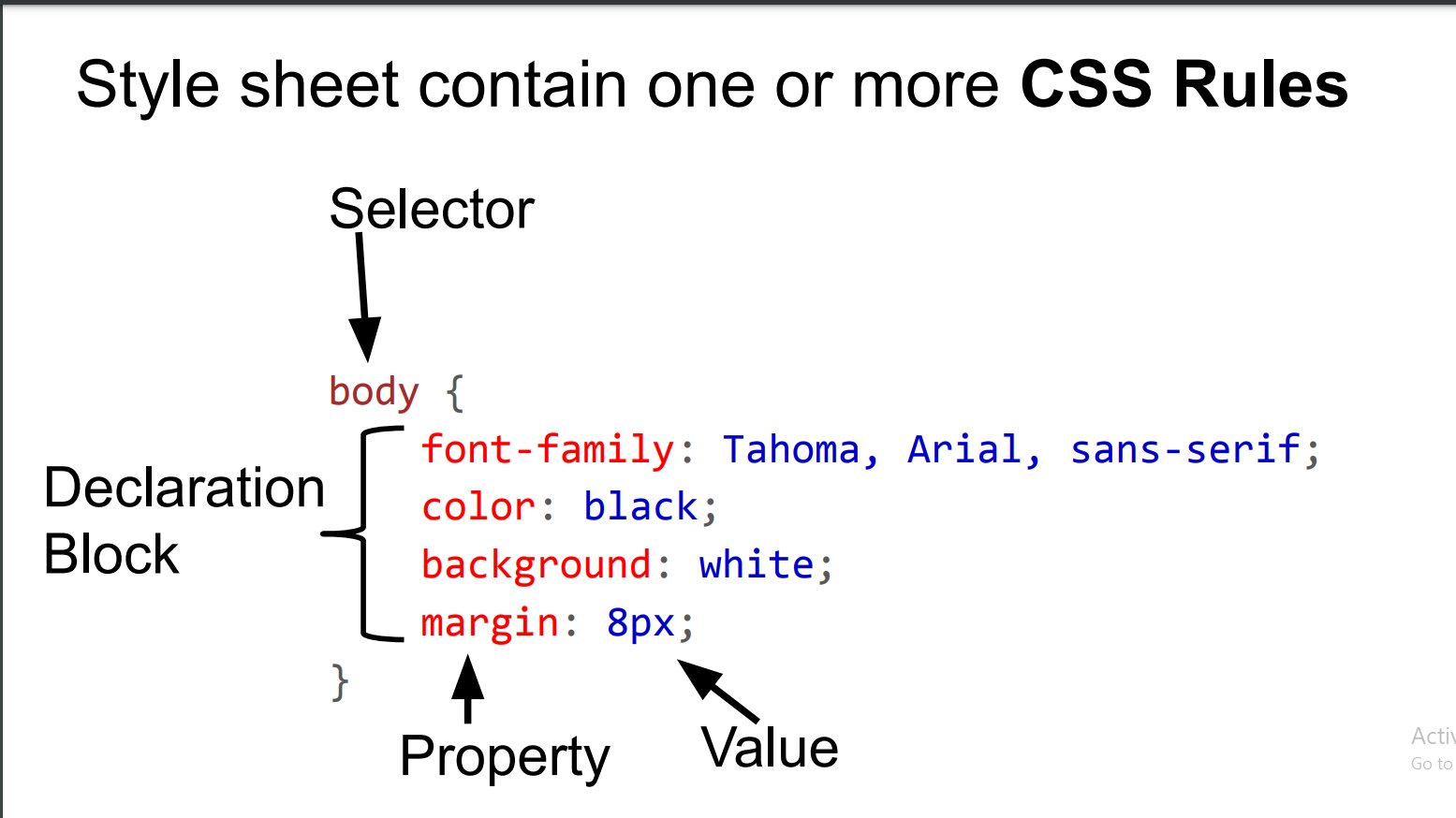
A style sheet consists of a list of rules. Each rule or rule-set consists of one or more selectors, and a declaration block.
Selector
"CSS class" redirects here. For non-CSS use of element classes in HTML, see class attribute (HTML).
In CSS, selectors declare which part of the markup a style applies to by matching tags and attributes in the markup itself.
Selectors may apply to the following:
all elements of a specific type, e.g. the second-level headers h2
elements specified by attribute, in particular:
id: an identifier unique within the document, denoted in the selector language by a hash prefix e.g. #id
class: an identifier that can annotate multiple elements in a document, denoted by a dot prefix e.g. .classname (the phrase "CSS class", although sometimes used, is a misnomer, as element classes—specified with the HTML class attribute—is a markup feature that is distinct from browsers' CSS subsystem and the related W3C/WHATWG standards work on document styles; see RDF and microformats for the origins of the "class" system of the Web content model)
elements depending on how they are placed relative to others in the document tree.
Classes and IDs are case-sensitive, start with letters, and can include alphanumeric characters, hyphens, and underscores.
Style sheet contain one or more CSS Rules
body {
font-family: Tahoma, Arial, sans-serif;
color: black;
background: white;
margin: 8px;
}
4
Selectorv
Property Value
Declaration
Block
There are three types of CSS which are given below:
Inline: Inline CSS contains the CSS property in the body section attached with the element known as inline CSS.
!DOCTYPE html>
html>
head>
title>Inline CSS/title>
/head>
body>
p style = "color:#009900; font-size:50px;
font-style:italic; text-align:center;">
education
/p>
/body>
/html>
Internal or Embedded: The CSS ruleset should be within the HTML file in the head section i.e the CSS is embedded within the HTML file.
!DOCTYPE html>
html>
head>
title>Internal CSS /title>
style>
.main {
text-align:center;
}
.GFG {
color:#009900;
font-size:50px;
font-weight:bold;
}
.geeks {
font-style:bold;
font-size:20px;
}
/style>
/head>
body>
div class = "main">
div class ="GFG">education
div class ="edu">
A computer science portal for geeks
/div>
/div>
/body>
/html>
External: External CSS contains a separate CSS file that contains only style property with the help of tag attributes.
!DOCTYPE html>
html>
head>
link rel="stylesheet" href="geeks.css"/>
/head>
body>
div class = "main">
div class ="GFG">GeeksForGeeks
div id ="geeks">
A computer science portal for geeks
/div>
/div>
/body>
/html>
its code
body {
background-color:powderblue;
}
.main {
text-align:center;
}
.GFG {
color:#009900;
font-size:50px;
font-weight:bold;
}
#geeks {
font-style:bold;
font-size:20px;
}